
Quick Answer
To check your e-challan on the e-Pay Punjab app: open the app, tap Punjab Police, select E-Challan (Safe City), enter your Vehicle Registration Number and your CNIC (without dashes) or Chassis Number, then tap Search. The app pulls every unpaid challan linked to that vehicle from the Safe City database. Select the challans you want to clear and tap Generate Challan to get a 17-digit PSID, which you can pay through any bank’s ATM, mobile/internet banking, or over the counter anywhere in Pakistan.
Key Facts
| Detail | Information |
|---|---|
| App name | e-Pay Punjab (developed by Punjab Information Technology Board) |
| Department used for e-challan | Punjab Police → E-Challan (Safe City) |
| What you need | Vehicle Registration Number + CNIC (no dashes) or Chassis Number |
| Output | 17-digit PSID (Payment Slip ID) |
| Where to pay the PSID | ATM, mobile banking, internet banking, or over-the-counter at any bank in Punjab and across Pakistan |
| Cost to use the app | Free — you only pay the fine amount, no service charge for checking |
| Cities covered | Lahore, Multan, Faisalabad, Rawalpindi, Gujranwala, Bahawalpur, Sargodha (PSCA Safe City coverage) |
| Payment history | Available in-app under the History tab |
| PSID validity | Typically valid for a limited window before it needs regenerating — see FAQ below |
What Is the e-Pay Punjab App, and Is It the Same as the PSCA App?
This is where a lot of people get confused, so it’s worth clearing up before you download anything.
- e-Pay Punjab is the Government of Punjab’s official payment gateway app, built by the Punjab Information Technology Board (PITB). It handles multiple government dues in one place — token tax, property tax, vehicle registration, and e-challans issued through Safe City cameras — by generating a PSID you pay at any bank.
- PSCA Public Safety App is a separate app run by the Punjab Safe Cities Authority, focused on emergency services (Police-15, Alert-15, women’s safety) that also lets you check and manage challans directly, without a bank payment step in between.
Both apps can show you the same Safe City challan, but the e-Pay Punjab route is the one people usually land on when they specifically need to generate a PSID for over-the-counter or ATM payment — which is what this guide covers. If you’d rather compare the two apps side by side first, see our PSCA Public Safety App guide.
Step-by-Step: Checking Your E-Challan on e-Pay Punjab
- Download and open the e-Pay Punjab app (Android/iOS) or go to the e-Pay Punjab web portal.
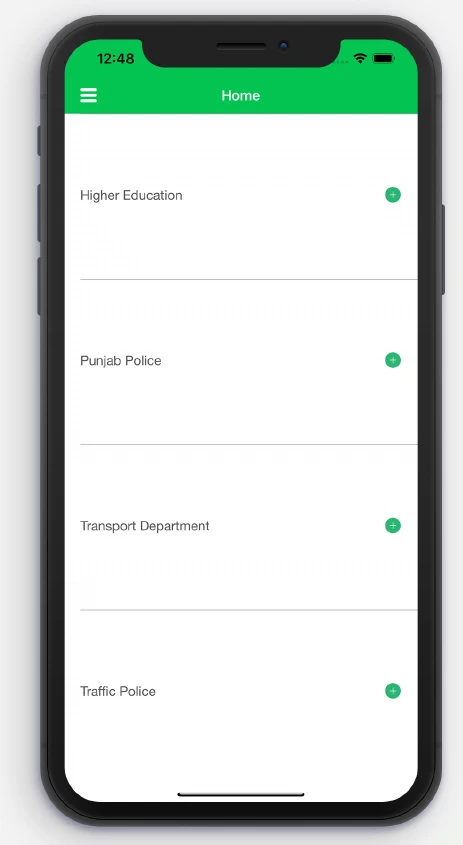
- Tap “Punjab Police” from the home screen menu — you’ll see it listed alongside Higher Education, Transport Department, and Traffic Police.
- Step 1: On the e-Pay Punjab home screen, tap Punjab Police — not Transport Department — to reach the e-challan section.
- From the dropdown, select “E-Challan (Safe City)” — not “Traffic Challan,” which is a different category for manually issued tickets. Show Image Step 2: Under Punjab Police, choose Safe City Authority. The Traffic Challan icon next to it is for manually issued tickets, not camera challans.
- Enter your Vehicle Registration Number, then your CNIC without dashes (just the 13 digits) or the vehicle’s Chassis Number if you don’t have the CNIC handy.
- Tap Search. The system checks the Safe City database in real time and lists every valid, unpaid e-challan tied to those details. Show Image Step 3: Enter your Vehicle Number and CNIC (no dashes) or Chassis Number, then tap Search to pull up any Safe City challans.
- Review the challans shown — each one usually lists the violation type, location/camera reference, date, and fine amount.
- Select the challan(s) you want to pay and tap Generate Challan to create your PSID.
- Copy or screenshot the 17-digit PSID. You now have 3 ways to pay it: ATM, internet/mobile banking, or an over-the-counter bank visit.


If you’d rather see the exact bank-by-bank payment steps for that PSID, our guides on paying via 1-Link ATM and paying via online banking walk through each channel with screenshots. Not sure what a PSID even is yet? Start with how to generate a PSID for e-challan payment.
Why Might No Challans Show Up When You Search?
This is the part the official guide skips entirely, and it’s the single most common reason people give up on the app. A blank result doesn’t always mean you’re clean.
| Possible Reason | What It Means | What To Do |
|---|---|---|
| No violation on record | You genuinely have no pending Safe City challan | Nothing to do — you’re clear |
| Challan not yet processed | Safe City cameras can take 24–72 hours to process a violation into the system | Check again after 2–3 days |
| Wrong CNIC format | You typed dashes (e.g., 35202-1234567-1) instead of digits only | Re-enter as 13 digits with no dashes |
| Vehicle recently transferred | Challan may still be linked to the previous owner’s CNIC | Search using the Chassis Number instead |
| Challan already paid | Some paid challans stop appearing in the active search after settlement | Check the History tab, or see our guide on e-challan paid but still showing unpaid |
| Outside Safe City coverage | The violation location isn’t covered by Safe City cameras (7 cities only) | Check via Punjab e-challan check online for non-Safe City challans |
How to Pay Once You Have the PSID
Your PSID is just a reference number — generating it doesn’t pay the fine. You have three official routes:
- ATM (1-Link network): Insert your card, select “Bill Payment” or “e-Pay Punjab,” enter the PSID, confirm the amount, and pay.
- Mobile/Internet Banking: Log into your bank’s app, find “Bill Payments” or “Government Dues,” enter the PSID under e-Pay Punjab, and confirm.
- Over the Counter: Visit any bank branch in Punjab (or most branches nationwide), give the teller your PSID, and pay in cash.
Common Mistakes That Delay Payment or Cause Confusion
- Letting the PSID expire. PSIDs are time-limited. If yours has lapsed, don’t try to force the old number through — regenerate a fresh one from the app.
- Paying at a bank not connected to the 1-Link/e-Pay network. Always confirm your bank supports e-Pay Punjab bill payments before heading to a branch.
- Assuming payment reflects instantly. Bank-to-government reconciliation isn’t real-time. Give it a working day or two before assuming something went wrong — see how long e-challan takes to update after payment.
- Ignoring the challan because “it’s a photo, not a ticket.” Safe City e-challans are legally enforceable the same way as manually issued challans; unpaid fines can escalate or block vehicle-related services like token tax renewal.
- Disputing a challan by simply not paying it. If you genuinely believe the challan is wrong (cloned plate, misread camera, wrong vehicle), don’t just ignore it — use the official appeal process instead. See how to appeal a wrong e-challan in Punjab.
E-Pay Punjab App vs. Checking on the Web: Which Should You Use?
| e-Pay Punjab App | e-Pay Punjab Web Portal | |
|---|---|---|
| Best for | Quick checks on the go, repeat users | One-off checks from a desktop |
| Login required | No | No |
| Saves search history | Yes, under History tab | No |
| Push notifications for new challans | Depends on app version/settings | Not available |
| Works without installing anything | No | Yes |
If you only need to check a challan once, the web portal is faster. If you own a vehicle and expect to check regularly, the app’s History tab saves you re-entering details every time.
Frequently Asked Questions
Is the e-Pay Punjab app free to use?
Yes. Downloading and using the app to check and generate a PSID is completely free — you only pay the actual fine amount when you settle the PSID at a bank.
Do I need to create an account to check my e-challan?
No. The E-Challan (Safe City) section only asks for your Vehicle Registration Number and CNIC or Chassis Number — no login or registration is required.
What’s the difference between CNIC and Chassis Number search?
CNIC search ties the challan to the registered vehicle owner’s identity; Chassis Number search works off the vehicle’s physical identifier and is useful if the vehicle has recently changed ownership or you don’t have the owner’s CNIC on hand.
Can I pay the fine directly in the app without a PSID?
No. The app’s role is to look up the challan and generate the PSID. Actual payment happens through your bank — ATM, mobile/internet banking, or over the counter — using that PSID.
How long is a generated PSID valid for?
PSIDs generated through e-Pay Punjab typically remain valid for a limited period before they expire and need to be regenerated. If your payment attempt is rejected as “expired,” go back into the app and generate a new PSID for the same challan.
What if my vehicle number shows a challan that isn’t mine?
This can happen with cloned or misread number plates. Don’t pay it — follow the formal appeal process through PSCA rather than disputing it inside the e-Pay app, which has no dispute feature.
Does e-Pay Punjab cover challans outside Lahore, Multan, Faisalabad, Rawalpindi, Gujranwala, Bahawalpur, and Sargodha?
Safe City camera-based e-challans are limited to these seven cities where PSCA currently operates. Manual/traffic-police-issued challans from other cities may need to be checked through different channels.
Next step: Once you’ve generated your PSID, head to our step-by-step breakdown of how to pay e-challan via 1-Link ATM or how to pay e-challan via online banking to finish the payment. If your challan doesn’t show up at all, check why your e-challan isn’t showing online before assuming you’re in the clear.

Azam Malik is the founder of echallanpak.com, a platform dedicated to helping users in Pakistan check their traffic e-challan quickly and easily. He focuses on building simple, user-friendly online tools and guides that make government-related processes more accessible to the public.
With a strong interest in web development and digital solutions, Azam Malik ensures that all content on the site is clear, accurate, and regularly updated for a better user experience.
Note: echallanpak.com is an independent informational website and is not affiliated with any government authority.