Last Updated: July/2026
TL;DR — Quick Answer
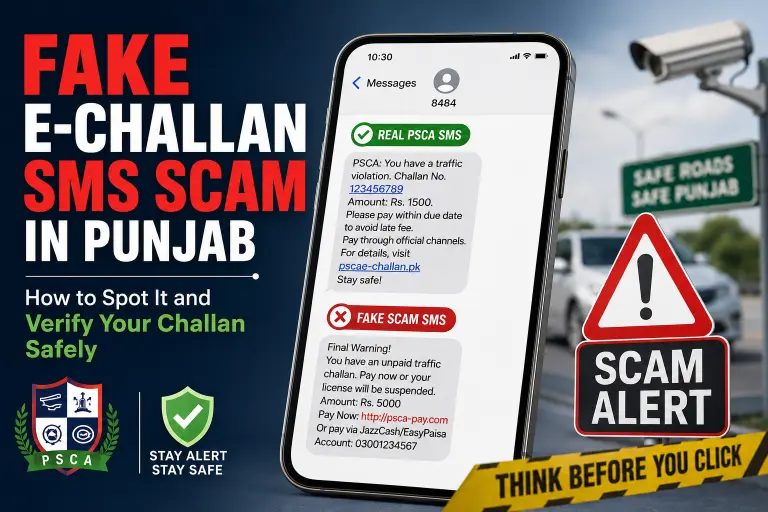
If you get an SMS claiming you have an unpaid traffic challan in Punjab, don’t click the link. Scammers are sending fake e-challan messages that look official — sometimes mentioning a real location you just passed — to steal banking details through fraudulent websites. The only official domain for checking a real e-challan is echallan.psca.gop.pk. Always type this in manually or search for it, verify your vehicle by its registration number yourself, and pay only by generating a PSID through the e-Pay Punjab app. Never pay through a link sent in a text message.
Key Facts
| Fact | Detail |
|---|---|
| Official verification site | echallan.psca.gop.pk |
| Official payment method | Generate PSID via e-Pay Punjab app, then pay through JazzCash, EasyPaisa, 1-Link ATM, or bank |
| Real e-challan SMS behavior | Comes from an official short code, does not contain a payment link |
| Where scam links usually differ | Lookalike domain names, .com instead of .gov.pk, extra words or hyphens |
| Where scams also appear | SMS and WhatsApp messages |
| Who to report to | Police Helpline 15 (select the e-challan/cyber option) or FIA Cyber Wing |
| Cost of official PSCA verification | Free — PSCA never charges for checking a challan |
Why This Scam Feels So Convincing
If you’re new to Lahore or just driving through areas with heavy Safe City camera coverage — places like Old Lahore, major signals, and busy arteries — it’s easy to believe a challan SMS is real. Scammers have gotten good at making their messages match the moment:
- They often reference a location you actually passed recently, which makes the message feel personalized and real
- The wording mimics official traffic violation check language almost word for word
- They create a sense of urgency, pushing you to act immediately instead of pausing to verify
This is exactly the pattern people traveling in Punjab have reported: driving carefully, staying under the speed limit, and still receiving a message claiming an overdue ticket minutes after passing a specific spot. The location match is not proof the SMS is genuine — scammers can guess general routes or simply target high-traffic zones where camera enforcement is common knowledge.
How Real PSCA E-Challan Notifications Work
Genuine PSCA e-challan alerts follow a consistent pattern that scam messages struggle to fully copy:
- They’re sent from an official government short code, not a random personal mobile number
- Official messages typically do not include a clickable payment link at all
- Real notifications never ask you to enter banking details, card numbers, or OTPs through SMS
- PSCA does not request payment information over text message under any circumstance
If a message includes a link asking you to “pay now” and enter card or account details directly on that page, treat it as fraudulent — regardless of how official-looking the sender ID or message format appears.
Step-by-Step: How to Verify a Challan Safely
Don’t click the link in the SMS. Instead:
- Open your browser separately and manually type or search for echallan.psca.gop.pk — never tap a link from a text message
- Enter your vehicle registration number yourself on the official portal to pull up any real, pending challans
- Cross-check the details — a genuine challan will show the violation type, date, time, and location clearly, matched to your actual vehicle
- If a challan is real, generate your PSID through the e-Pay Punjab app
- Pay only through PSID-based channels — JazzCash, EasyPaisa, 1-Link ATM, or National Bank of Pakistan — never by entering card details on a page linked from an SMS
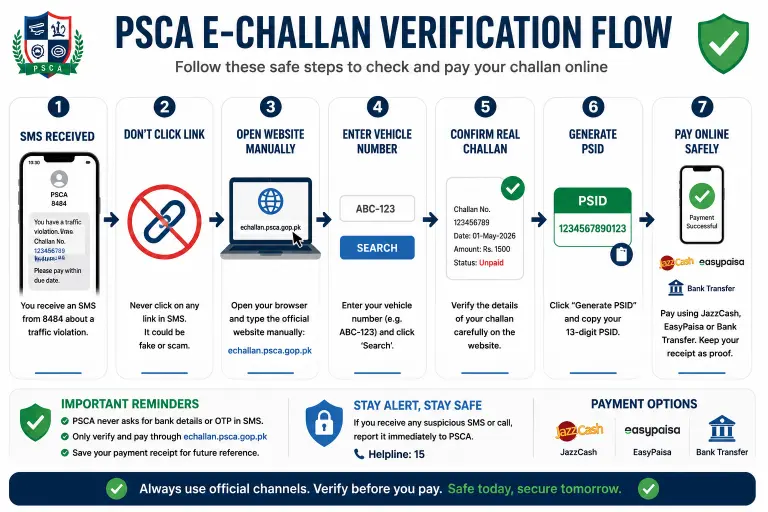
This is the same online challan verification process used for checking any legitimate Punjab traffic fine, and it works whether or not you actually received a text.
Real vs. Fake E-Challan SMS: Quick Comparison
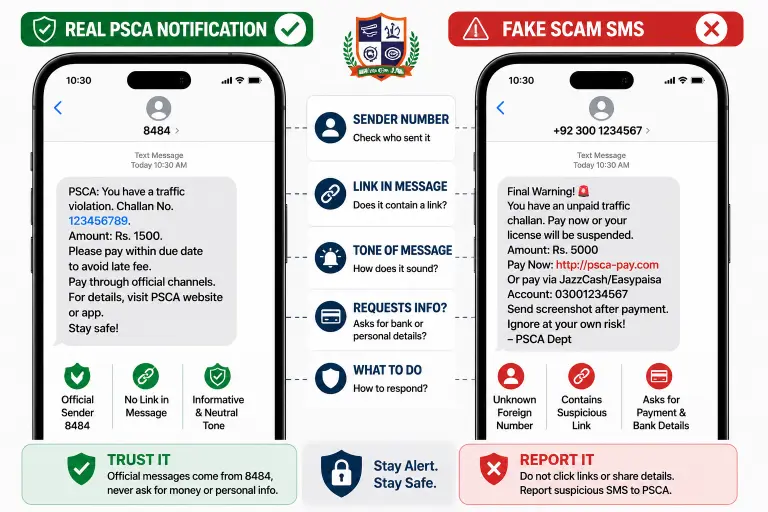
| Signal | Real PSCA Notification | Fake / Scam Message |
|---|---|---|
| Sender | Official government short code | Random mobile number or unfamiliar sender ID |
| Contains a payment link | Rarely, and never asks for card details directly | Yes, often urgent and prominent |
| Asks for bank/card details via SMS | Never | Frequently |
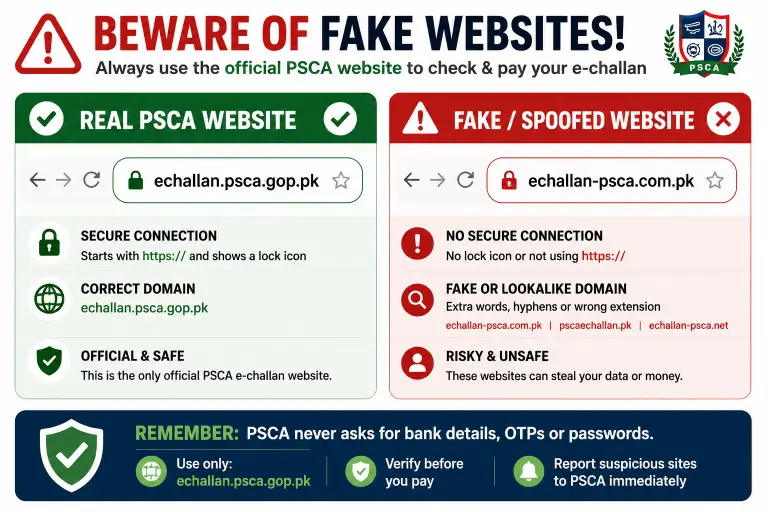
| Website domain | echallan.psca.gop.pk only | Lookalike domains, extra words, wrong extension |
| Tone | Neutral, factual | Urgent, pressuring immediate payment |
| Verification cost | Free | May request payment or “processing fee” |
What to Do If You Already Clicked the Link
If you tapped a suspicious link but haven’t entered any payment or banking details, close the page and don’t proceed — no harm is likely done. If you did enter card details, PIN, or OTP on a page reached through an SMS link:
- Contact your bank immediately to freeze the card or account
- Change your mobile banking / wallet PIN right away
- Report the incident to the FIA Cyber Wing and Police Helpline 15
- Keep a screenshot of the SMS and the fake website as evidence
Got a Real Challan You Think Is Wrong?
Separately from scam messages, sometimes a genuine e-challan is issued incorrectly — wrong vehicle photo, mismatched registration number, or a violation you believe didn’t happen. In that case, the fix isn’t ignoring the SMS scam risk — it’s using the official appeal process through PSCA rather than any third-party site claiming to “cancel” challans for a fee. Legitimate correction and appeal requests only go through PSCA’s own channels.
FAQs
Is every e-challan SMS in Punjab a scam?
No. PSCA does send legitimate notifications, but they typically don’t include payment links or ask for banking details. Verify independently on echallan.psca.gop.pk rather than trusting the SMS content alone.
Can scammers really know my location from a text?
Not precisely. They often reference commonly monitored areas or high-traffic zones with known camera coverage, which can coincidentally match where you’ve just driven, making the message feel personalized.
Is checking my challan on the official PSCA site free?
Yes. Verifying a real e-challan through echallan.psca.gop.pk costs nothing. Any site asking for a fee just to “check” your challan should be treated as suspicious.
What number does PSCA send official messages from?
Government sources have referenced different official short codes over time, so the safest approach is not to rely on the sender number alone — always verify independently through the official PSCA website rather than trusting any SMS sender ID.
Should I reply to a suspicious e-challan SMS?
No. Don’t reply, click any link, or call any number provided in the message. Verify directly through the official portal instead.
Can this scam also come through WhatsApp?
Yes. The same fake challan pattern has been reported via WhatsApp messages as well as SMS, using the same lookalike links and urgency tactics.
Bottom Line
Real or not, the safest habit is the same every time: never click a link inside a challan SMS. Go to echallan.psca.gop.pk directly, check your vehicle yourself, and only pay through a PSID generated in the e-Pay Punjab app. This protects you whether the message turns out to be real or fake.
Disclaimer: This article is for informational purposes only and reflects publicly available guidance at the time of writing. Always verify current procedures and official contact numbers directly through PSCA’s official channels, as details can change over time.
Related: Check your e-challan online · Punjab Traffic Fine Calculator · How to appeal a wrong e-challan in Punjab
Azam Malik is the founder of echallanpak.com, a platform dedicated to helping users in Pakistan check their traffic e-challan quickly and easily. He focuses on building simple, user-friendly online tools and guides that make government-related processes more accessible to the public.
With a strong interest in web development and digital solutions, Azam Malik ensures that all content on the site is clear, accurate, and regularly updated for a better user experience.
Note: echallanpak.com is an independent informational website and is not affiliated with any government authority.